Shareable stakeholder previews on Optimizely SaaS CMS (headless): login-free links to unpublished content, and how they work

Letting someone outside the Optimizely CMS review a page before it goes live sounds like a setting you switch on. It is not one. Optimizely SaaS does not ship this out of the box, and on a headless build you have to develop it yourself. It is a small feature with a fair amount going on underneath, and it matters more to the business than its size suggests.

Here is how it works, what I got wrong, and the decisions worth making early.


The request

A few weeks before go-live, someone always asks:

“Can you send a link so they can see the page before we publish it?”

The reviewer is usually a legal contact, a brand manager, or a client sponsor. They will not get a CMS account, they will not be trained, and they will open the link on their phone.
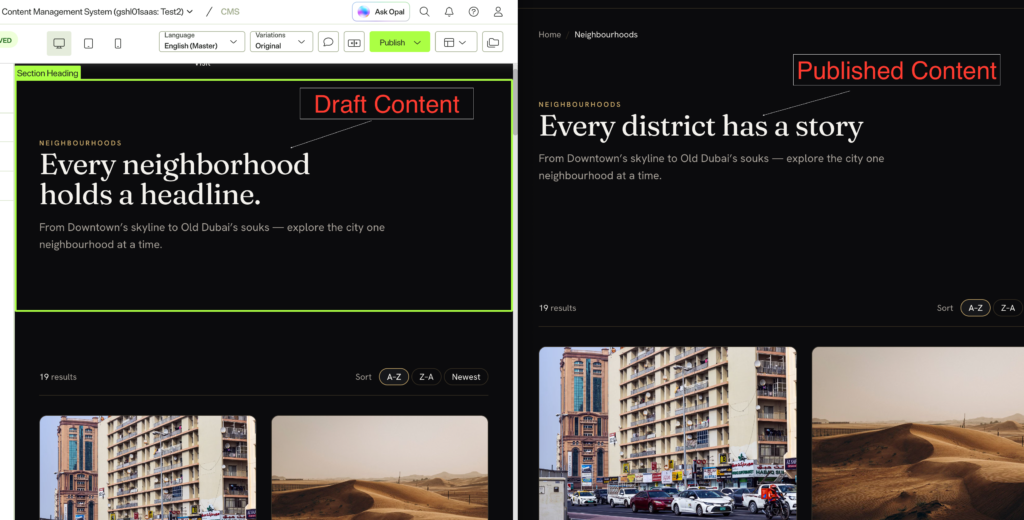
The CMS preview pane with the page still in Draft. This is the built-in author preview.

Read More

Component Naming Conventions for a CMS Website: A Practical Guide for Digital Teams

Hello Digital Team,

I am sure everyone of us has faced this moment. You are building a CMS component library, you have a beautiful design file on one screen and the CMS admin on the other, and you are stuck on one small thing: what do we actually call this thing?

A week later the content author opens the CMS, scrolls a list of forty components, and cannot find the one they need. Small naming decisions become big authoring problems. A tiny card variation ends up as “Card Block” and “Card Block New”, and now nobody knows which to use. This is the practical playbook I have used on Optimizely, Sitecore, and headless builds over the last twelve years, written for the developers, designers, and PMs setting a library up or cleaning one up.

The library at a glance. Most CMS libraries are these shelves. The names in bold are the plain, author-first labels I use.

  • Global (kept out of the picker): Top Navigation, Footer, Cookie Consent Banner, Announcement Bar
  • Hero: one Hero, with layout and media as options
  • Content blocks: Rich Text, Two Column Text, Text and Image, Text and Video, Quote, Callout
  • Cards: Card Grid + Card
  • Media: Image, Video, Image Gallery, Logo Strip
  • Call to action: CTA Banner, CTA Card
  • Interactive: Accordion, Tabs, Timeline, Stats, Testimonial
  • Listing: Article Listing, Event Listing, Related Content

Want the full picture? The CMS Component Index Drawing Set draws all 162, labeled by scope.

Read More

Semantic Search with Optimizely Graph – a Practical Guide

Optimizely Graph ships with semantic search built in. No vector database, no embedding pipeline, no second index to keep in sync – you add one argument to a GraphQL query and you get vector search over your CMS content.

That’s a genuinely big deal, and it’s why I didn’t reach for pgvector one of the demo project. So I built site /search page that understands what people mean, is 100% server-rendered, URL-driven, and ships zero client JavaScript.

The good news: it works, and it’s about four lines of GraphQL. The interesting news: my first three attempts at verifying it worked were all measuring the wrong thing, and the fix for the biggest problem isn’t in any documentation I could find.

Read More

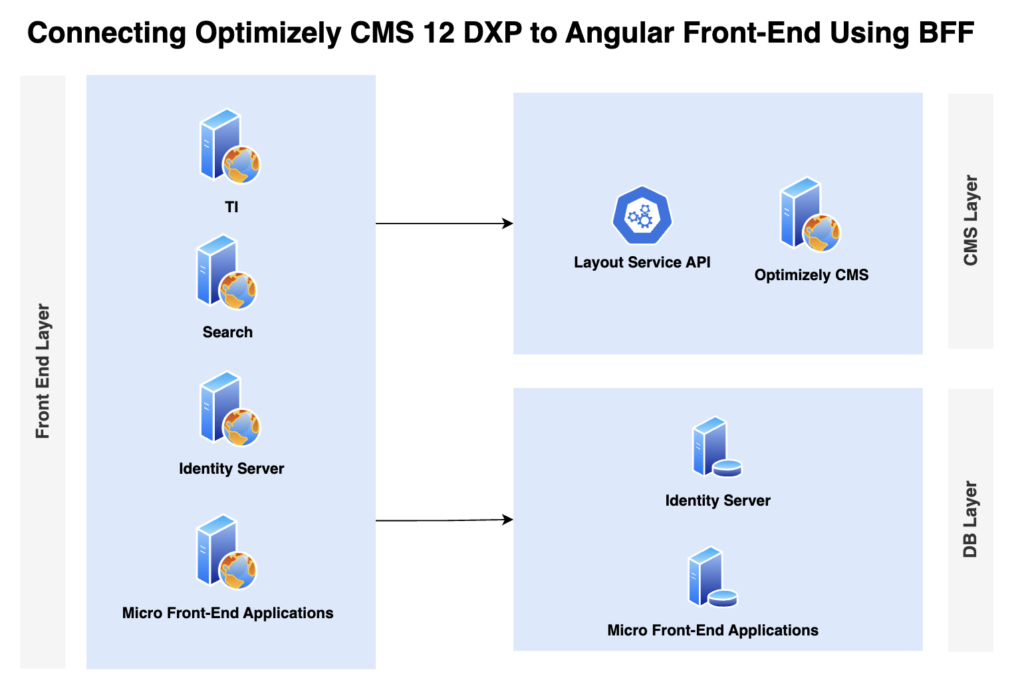
Bridging Optimizely CMS and Angular with BFF Pattern

Introduction

We recently worked on an Angular-based project where the front-end team was developing in a micro-front-end architecture—completely isolated from the back-end and with no exposure to Optimizely CMS. Their world revolved around Angular development and independently deployed micro-front-end applications.

Our challenge was to introduce Optimizely as the CMS backbone for content authoring and to manage the content tree structure. We needed a foundational architecture that allowed both front-end and back-end teams to work productively and in parallel across sprints—without stepping on each other’s toes.

Connecting Optimizely CMS 12 DXP to Angular Front-End Using BFF
Read More

Understanding Optimizely DXP Environment: A Comprehensive Guide

Introduction

Having recently worked on an Optimizely project, I gained valuable insights into the capabilities and best practices of the Optimizely DXP environment. This experience reinforced my understanding of its scalability, security, and performance optimizations. I worked on a migration project from Sitecore to Optimizely, which involved migrating five complex websites originally built on Sitecore and WordPress to Optimizely. This migration required careful planning, content restructuring, and performance optimization to ensure a seamless transition. To successfully deliver this project, I collaborated with an incredible team of 25+ professionals, each contributing expertise across development, architecture, quality assurance, and deployment.

Optimizely Digital Experience Platform (DXP) is a powerful cloud-based solution designed to help businesses deliver exceptional digital experiences. It provides a scalable, secure, and high-performance environment for managing and optimizing content. This blog will explore the key components, benefits, and best practices for working with Optimizely DXP.

Read More