Optimizely Graph ships with semantic search built in. No vector database, no embedding pipeline, no second index to keep in sync – you add one argument to a GraphQL query and you get vector search over your CMS content.
That’s a genuinely big deal, and it’s why I didn’t reach for pgvector one of the demo project. So I built site /search page that understands what people mean, is 100% server-rendered, URL-driven, and ships zero client JavaScript.
The good news: it works, and it’s about four lines of GraphQL. The interesting news: my first three attempts at verifying it worked were all measuring the wrong thing, and the fix for the biggest problem isn’t in any documentation I could find.
The four lines that turn on semantic search
query($q: String!) {
  PointOfInterest(
    where:   { _fulltext: { match: $q } }
    orderBy: { _ranking: SEMANTIC, _semanticWeight: 0.5 }
    limit:   12
  ) {
    items { name summary _score _metadata { url { default } } }
  }
}
_ranking: SEMANTIC is the switch. _semanticWeight blends meaning against keyword matching (default 0.2; higher favours meaning). That’s it – that’s the feature.
Proving it actually works (harder than it sounds)
My first test looked great. I searched “somewhere to take the kids” and got back Nakheel Mall, The Dubai Mall, and Museum of the Future. Semantic search, clearly working!
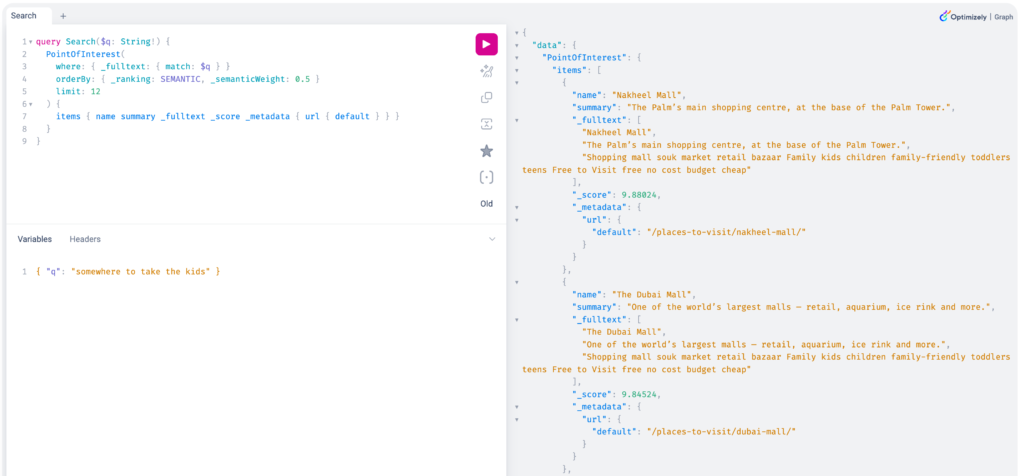
Except – look at those three names again. They all contain “the”. I hadn’t proven anything; I’d just watched BM25 match a stop word.
To actually prove semantic matching, you need queries with zero lexical overlap with the target content, and you need to compare against keyword ranking as a control. So I ran every query twice – once with _ranking: RELEVANCE, once with SEMANTIC:
| Query | RELEVANCE (keyword) | SEMANTIC |
|---|---|---|
| “skyscraper” | 0 results | Burj Khalifa – summary says “tallest building” |
| “fish tank” | 0 results | The Dubai Mall – summary says “aquarium” |
That’s the proof. The word “skyscraper” appears nowhere in my content. Neither does “fish tank”. Keyword search finds nothing; semantic search finds exactly the right page. No embedding infrastructure, no vector DB – just an orderBy argument.
Lesson before we go further: always test relevance with a control ranking. It is very easy to demo a semantic search that is quietly just keyword matching.
Gotcha #1 – stop words sabotage semantic ranking
This is the big one, and it cost me the most time.
I searched “swimming in the sea” on a site whose content includes Jumeirah Beach and Palm Jumeirah. The top result was a historical district. Not a beach in sight.
Here’s why. _fulltext is BM25-scored, and that score is computed before the semantic blend. The stop words in and the matched all over my content and generated enormous BM25 scores – the historical district scored 7.5 – while the genuine semantic matches scored around 0.09. The semantic signal wasn’t wrong. It was just two orders of magnitude too small to matter.
The fix is embarrassingly simple: strip stop words before you query.
| Query sent to Graph | Top results |
|---|---|
swimming in the sea | Al Fahidi Historical Neighbourhood (7.5), The Dubai Fountain, The Dubai Mall |
swimming sea | The Dubai Fountain, Jumeirah Beach, Palm Jumeirah |
const STOP_WORDS = new Set(['a', 'an', 'and', 'in', 'is', 'of', 'on', 'the', 'to', 'where', /* … */]);

export function normalizeQuery(raw: string): string {
  const words = raw.toLowerCase().replace(/[^\p{L}\p{N}\s-]/gu, ' ').split(/\s+/).filter(Boolean);
  const kept = words.filter((w) => !STOP_WORDS.has(w));
  // Fall back to the original words, so searching literally for "where to go"
  // doesn't silently become a blank query.
  return (kept.length > 0 ? kept : words).join(' ');
}
This also explains a symptom that had me completely stuck: _semanticWeight appeared to do nothing. I tested 0.2, 0.5, 0.8 on a natural-language query and got byte-identical result ordering every time. I assumed the parameter was broken or unsupported.
It wasn’t. When BM25 is producing scores of 7.5 and the semantic component is producing 0.09, re-weighting the blend changes nothing you can see. Strip the stop words and _semanticWeight starts behaving exactly as documented. If you’re tuning semantic weight and seeing no effect, this is almost certainly why.
Gotcha #2 – don’t run site search against the _Content interface
The obvious way to search across every content type at once is Graph’s generic _Content interface. One query, everything in it, one ranked list. I tried it first.
The top result for “traditional culture and heritage” came back with a score of 115 – about eight times the next result. It was a TagTerm: a taxonomy term, one of my shared blocks. Not a page. Not something a user can visit. It doesn’t even have a URL to link to.
Of course it scored highly – a taxonomy term literally named “Culture & Heritage” is a perfect lexical match. It’s just not a search result.
_Content matches everything in your model, including config singletons, taxonomy terms, and any other non-routable block you’ve modelled. Query the concrete types instead:
query($q: String!, $w: Float!, $limit: Int!) {
  places:         PointOfInterest(where: { _fulltext: { match: $q } }, orderBy: { _ranking: SEMANTIC, _semanticWeight: $w }, limit: $limit) {
    items { name summary priceBand _score _metadata { url { default } } }
  }
  events:         Event(where: { _fulltext: { match: $q } }, orderBy: { _ranking: SEMANTIC, _semanticWeight: $w }, limit: $limit) {
    items { name summary startDate endDate _score _metadata { url { default } } }
  }
  neighbourhoods: Area(where: { _fulltext: { match: $q } }, orderBy: { _ranking: SEMANTIC, _semanticWeight: $w }, limit: $limit) {
    items { name summary _score _metadata { url { default } } }
  }
}
GraphQL aliases work on Graph root fields, so this is still a single round trip. You also get type-specific fields for free – price bands for places, dates for events – which the generic interface can’t give you.
Gotcha #3 – scores are not comparable across content types
Having got three result sets back, I naturally wanted to merge them into one relevance-ranked list. Don’t.
One query returned an Area scoring 13.73 and a PointOfInterest scoring 1.51. The Area is not “nine times more relevant” – Graph normalizes BM25 per index, so the two numbers are measured on different scales. Sorting them against each other produces a ranking that looks authoritative and means nothing.
So I group results by type – Places to Visit, Events, Neighbourhoods – each ranked within itself. It’s more honest, and it’s also better UX: people scanning a travel site usually know whether they want a place or an event.
Gotcha #4 – your taxonomy’s synonyms aren’t in search until you put them there
Stripping stop words got “swimming sea” to surface beaches. But a blunter query exposed a deeper gap: “swimming” on its own ranked three waterparks first, then a fountain, an aquarium and a dolphinarium – and the actual beaches sat below them.
That’s not wrong, exactly – a waterpark genuinely is about swimming. The real problem is what didn’t rank: a beach, the most obvious place a human means by “swimming.” Semantic ranking scores the text each place carries, and my beach summaries talk about “boardwalks, beach clubs, sunset” – never swimming. The engine has no world-knowledge that a beach is where you swim.
I had modelled that knowledge – my Beaches taxonomy term carries a synonyms list of exactly sea, coast, swimming, shore. The trouble:
Optimizely Graph’s
_fulltextonly searches a type’s OWN fields. It does not follow acontentReferenceto search the referenced Tag’ssynonyms. So all that carefully-authored synonym vocabulary was completely invisible to search – a beach tagged “Beaches (swimming)” gained nothing from it.
The fix is denormalization: bake each item’s tag vocabulary into a searchable field on the item itself. I added a searchKeywords string (indexed searchable) to PointOfInterest and Event; the seed populates it from the item’s tags – name + synonyms:
// seed: tag slug → "Name synonym1 synonym2 …", joined across an item's tags
const tagVocab = new Map(tags.map((t) => [t.slug, [t.name, ...t.synonyms].join(' ')]));
const searchKeywords = item.tags.map((slug) => tagVocab.get(slug)).join(' ');
// → Palm West Beach: "Beaches waterfront sea coast swimming shore  Free to Visit …"
Now the beach’s own index literally contains “swimming”, so _fulltext matches it and the semantic embedding shifts toward the concept. Because _fulltext automatically covers every searchable field, the search query didn’t change at all – the whole fix lives in the model + seed.
The before/after, measured live on the same query:
swimming – before | swimming – after |
|---|---|
| Legoland, Wild Wadi, Aquaventure (waterparks), then Dubai Fountain, Dubai Aquarium, Dolphinarium | Jumeirah Corniche, Bluewaters Beach, Sunset Beach, Palm Jumeirah, Marina Beach, Jumeirah Beach … |
Two things worth knowing:
- It enriches BM25 and the vector. The denormalized text is part of what Graph embeds, so this isn’t keyword stuffing – it moves the semantic representation too.
- Denormalization amplifies your taxonomy, so curate it. My first pass also added swim/swimming to the Waterparks tag (“a waterpark is a swimming place, right?”). Every waterpark inherited it and, being short keyword-dense pages, they shot back above the beaches – the exact thing I was fixing. A synonym you add propagates to every item carrying that tag and can outrank what you actually meant. Keep synonyms tight and intent-aligned; put a concept on the one tag it most belongs to.
The broader lesson: semantic search matches what your content says, not what you know. When there’s a real-world association the prose doesn’t state – beach ⇒ swimming – you have to hand the model that signal, and your taxonomy is where it already lives. You just have to get it into the searchable index.
The part nobody warns you about: vector search always returns something
Keyword search has a natural empty state – no keyword, no match. Vector search doesn’t. It returns nearest neighbours, and something is always nearest.
Real example. Searching “traditional heritage” returned four places scoring:
0.185   Al Fahidi Historical Neighbourhood   ← genuinely relevant
0.039   Gold Souk                            ← relevant
0.006   …                                    ← noise
0.003   …                                    ← noise
Two real results and two pieces of padding presented with exactly the same visual weight.
So you need a relevance floor. My instinct was an absolute threshold – “drop anything under 0.15”. That instinct is wrong, for two reasons:
- The scale moves enormously. Across my test queries, top scores ranged from 0.185 to 1538. There is no fixed number that means “relevant”.
- It deletes correct answers. “swimming sea” scores its beaches at 0.092 and 0.078. Any floor high enough to suppress noise would have thrown away the two results I’d just spent an hour getting to surface.
A relative floor solves both – keep results scoring at least 10% of their own group’s top hit:
function dropWeakMatches(nodes: ResultNode[]): ResultNode[] {
  const top = nodes[0]?._score ?? 0;          // Graph returns them pre-sorted
  if (top <= 0) return nodes;
  return nodes.filter((n) => (n._score ?? 0) >= top * 0.1);
}
It’s scale-invariant, so it works whether the top score is 0.18 or 1538. “traditional heritage” now returns two places instead of four, and “tallest tower” drops from five to two.
Being honest about the limit: this trims tails, it does not detect nonsense. Most gibberish (“asdfgh”, “quantum blockchain accounting”) returns zero results all by itself. But a near-miss token like “zzzzqqq” comes back with a flat spread of low scores – 0.136, 0.112, 0.107, 0.087 – and no relative floor can separate a flat spread from a real one. I could have tuned a magic constant that happens to kill “zzzzqqq”, but fitting a threshold to a single test string isn’t tuning, it’s overfitting. It’s documented as a known limitation and I’ll revisit it with more content.
What it looks like
The whole thing is a Next.js server component. A plain GET <form> posts to /search?q=…, the server queries Graph and renders – no useState, no client fetching, no loading spinner. The URL is the entire state, so every search is shareable and cacheable.
The result
Site-wide search that matches on meaning, across three content types, in one Graph round trip, with no vector database and no client JavaScript. “Skyscraper” finds the tower. “Fish tank” finds the mall with the aquarium.
If you take five things from this:
- Test relevance against a control ranking (
RELEVANCEvsSEMANTIC), with zero-overlap queries – or you’ll ship keyword search believing it’s semantic. - Strip stop words, or BM25 will drown the semantic signal – and
_semanticWeightwill look broken. - Query concrete types, not
_Content, and never merge scores across types. - Use a relative relevance floor, because vector search always returns something.
- Get your taxonomy into the index.
_fulltextcan’t see a referenced tag’ssynonyms– denormalize them onto the item, or your carefully-modelled vocabulary does nothing for search.
Good Read
https://docs.developers.optimizely.com/platform-optimizely/docs/semantic-search
https://world.optimizely.com/blogs/juntes-blog/dates/2023/10/do-you-know-what-i-mean-introducing-semantic-search-in-optimizely-graph/