Shareable stakeholder previews on Optimizely SaaS CMS (headless): login-free links to unpublished content, and how they work

Letting someone outside the Optimizely CMS review a page before it goes live sounds like a setting you switch on. It is not one. Optimizely SaaS does not ship this out of the box, and on a headless build you have to develop it yourself. It is a small feature with a fair amount going on underneath, and it matters more to the business than its size suggests.

Here is how it works, what I got wrong, and the decisions worth making early.


The request

A few weeks before go-live, someone always asks:

“Can you send a link so they can see the page before we publish it?”

The reviewer is usually a legal contact, a brand manager, or a client sponsor. They will not get a CMS account, they will not be trained, and they will open the link on their phone.
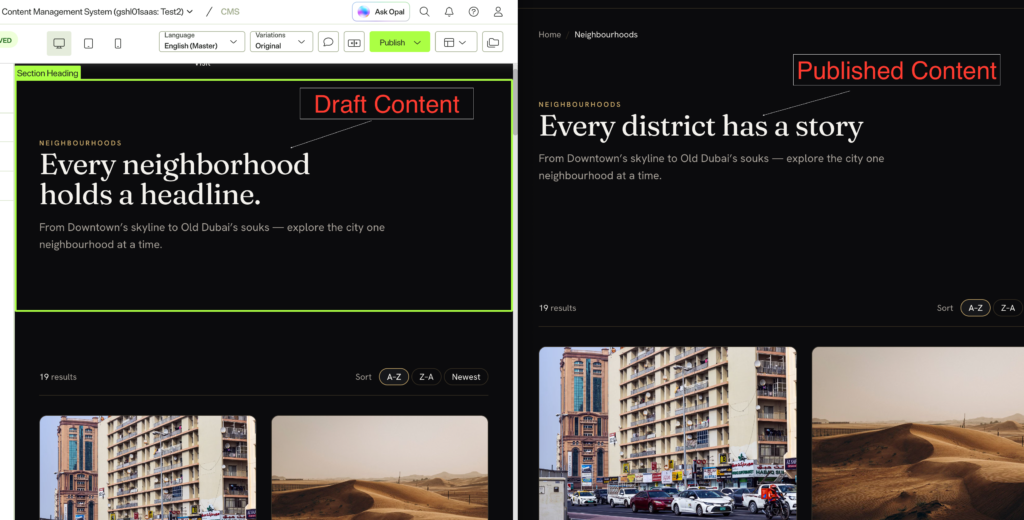
The CMS preview pane with the page still in Draft. This is the built-in author preview.

Read More

Component Naming Conventions for a CMS Website: A Practical Guide for Digital Teams

Hello Digital Team,

I am sure everyone of us has faced this moment. You are building a CMS component library, you have a beautiful design file on one screen and the CMS admin on the other, and you are stuck on one small thing: what do we actually call this thing?

A week later the content author opens the CMS, scrolls a list of forty components, and cannot find the one they need. Small naming decisions become big authoring problems. A tiny card variation ends up as “Card Block” and “Card Block New”, and now nobody knows which to use. This is the practical playbook I have used on Optimizely, Sitecore, and headless builds over the last twelve years, written for the developers, designers, and PMs setting a library up or cleaning one up.

The library at a glance. Most CMS libraries are these shelves. The names in bold are the plain, author-first labels I use.

  • Global (kept out of the picker): Top Navigation, Footer, Cookie Consent Banner, Announcement Bar
  • Hero: one Hero, with layout and media as options
  • Content blocks: Rich Text, Two Column Text, Text and Image, Text and Video, Quote, Callout
  • Cards: Card Grid + Card
  • Media: Image, Video, Image Gallery, Logo Strip
  • Call to action: CTA Banner, CTA Card
  • Interactive: Accordion, Tabs, Timeline, Stats, Testimonial
  • Listing: Article Listing, Event Listing, Related Content

Want the full picture? The CMS Component Index Drawing Set draws all 162, labeled by scope.

Read More